The Fast Way to Sweden - BGP Routing Experiments

I set up a VPS in Stockholm, but was a little surprised by the ping times from here in Helsinki to the server. It turns out that, just as in the physical world - there’s more than one way to get there, some faster than others…
Round Trip (ping) Times
As part of my experiments with BGP and internet routing - I’ve set up a VPS with Paradox in Stockholm. My thinking was, Stockholm is closer than Düsseldorf or London to the endpoints I want to set up in Finland - so round trip times there from these endpoints should also be fairly low. What actually happened surprised me. This table shows the average Round Trip Time (RTT) in ms from 2 different Finnish ISPs (one mobile) and Hetzner in Helsinki to this instance, and for comparison, ones in Tallinn and London:
| Source ISP | Stockholm | London | Tallinn |
|---|---|---|---|
| DNA - IPv4 | 38.6 | 40.3 | 38.6 |
| DNA - IPv6 | 27.9 | 35.0 | 6.8 |
| Telia (5G) - IPv4 | 98.5 | 101.6 | 50.4 |
| Telia (5G) - IPv6 | 58.3 | 85.4 | 49.9 |
| Hetzner VPS (Helsinki) - IPv4 | 39.2 | 63.9 | 54.9 |
| Hetzner VPS (Helsinki) - IPv6 | 38.8 | 61.8 | 24.0 |
The difference between ping times with IPv6 and IPv4 to Tallinn is also worth looking at, but for now I am going to focus on improving the round trip (ping) time to Stockholm from Finland. I think the <10ms is a reasonable expectation. 5G connections in general will have higher ping times than the wired networks (reflected in the Telia results), so for all measurements while developing this - I’ll use a fixed connection ISP.
Routes Taken
Using MTR, I took a look at the routes taken to get there. I inferred locations from the rDNS values as well as looking up information with whois. This is for IPv6 only:
DNA
Helsinki -> Hurricane Electric (T1 Transit) -> Amsterdam IX -> Stockholm
Telia
Helsinki -> Arelion (T1 Transit) Stockholm -> ERA IX Netherlands (maybe) -> Stockholm
Hetzner
Helsinki -> Piter IX Moscow -> Stockholm
That last route is certainly quite curious to put it mildly, and it feels unlikely that major data centres in these nearby Nordic capitals are only connected via quite circuitous routes. Let’s see if we can get our traffic to flow more sensibly. Of course, the routes that we are seeing here might well be very sensible for the ISPs involved. There are probably commercial agreements, traffic management and other considerations that they are taking into account. We have to accept that there’s nothing that can be done to change that, but perhaps we could still do something to force the flow of traffic to this instance (not necessarily using this particular IP address mind) to go in a preferred way.
A shorter prefix?
One thing that could be happening here is that the IP address assigned to this instance by the supplier might be part of a larger block covering several Points of Presence (PoPs). This might mean that all ingress traffic is announced from a particular location, and somewhere like Amsterdam would be sensible. Spoiler: I checked and it doesn’t appear to be case here, but let’s stick with it.
Therefore, if I were to announce my own specific block from here - perhaps it will help. Happily I have a few /48 (the smallest size that can be announced publicly) IPv6 prefixes available to use, and also was able to receive another /24 of IPv4 from ARDC for this experiment. So I went and set up an announcement of the Provider Independent (PI) block 2001:67c:298::/48 and 44.30.126.0/24 to the Paradox Upstream - AS52025, and came back later once various filters and intermediate routers would have been updated. But absolutely no difference. As far as I could tell the prefix was being advertised in all the same places that the original IP address for the instance was - and the various ISPs were still choosing the original routes.
Mapping the Connection
Let’s now take a closer look to see what routes we could actually achieve from say, Hetzner in Helsinki, to where this instance is hosted in Stockholm.
Using whois, I learned that the IP addresses the Hetzner instance was using belonged to a network with the Autonomous System (AS) AS24940. With BGP.tools to help, we can learn that this AS is present at several Internet Exchanges (IXs). This effectively means that they would have free connectivity with the other networks present on that exchange. We clearly see this with the original route, the traffic flows to the Piter IX in Moscow, where it leaves Hetzner’s network and joins the Paradox (AS52025) network - which is my instance and network’s direct and only upstream in Stockholm (therefore, all traffic must flow through that). This is in effect, the ‘shortest’ route from Hetzner to my addresses - they pass only through one intermediate network, Paradox, to reach me.
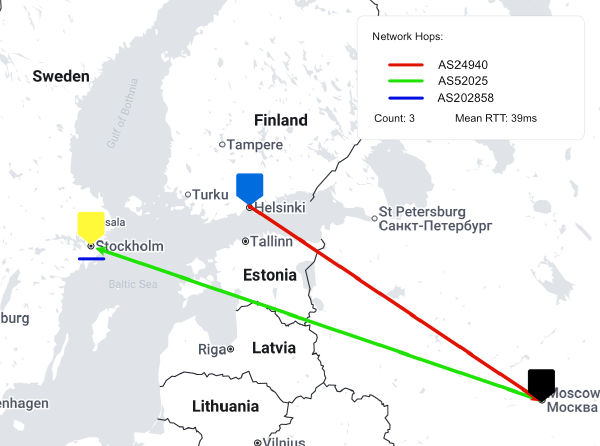
This is drawn above on a map and is the quickest and hence ‘cheapest’ networking distance for this route; Data flows directly to the destination network via settlement free peering. It is this kind of ‘distance’ that really drives many of the routing decisions on the internet. Somewhat ironically however, given current geopolitical realities, bandwidth to and from Moscow exchanged with foreign networks is reported as being a constrained resource and hence somewhat expensive in terms of actual currency.
Peers, Upstreams and Internet Exchanges
Here’s the mental model I use to understand what is meant by these terms:
Upstream Imagine you live in an apartment building and have an internet connection with a commercial ISP in your apartment with your own router. You have a laptop, phone and a NAS full of music attached to this router. These form your network. In order to access anything that’s not on your network, you have to send the packets to your ISP, the upstream.
Peers Your neighbour has a similar setup - but instead of a NAS they have a printer attached. You get on well and would like to link your networks so that you can use their printer and they can use your NAS. Miraculously you’re able to string an ethernet cable between your two apartments and link the routers. You agree to not send traffic through each other’s ISPs (upstreams) - i.e you don’t share your actual internet connections, just access to physical things you have connected on your networks, and you both still keep a connection with your respective ISPs. You (or rather your networks) are now peers with one another.
Internet Exchanges Your other friendly neighbour has a 3D printer on their network and wants to join in. At this point, you discover some space in the basement and put an ethernet switch in there - with all 3 of you connected and you remove the earlier cable. That switch is the internet exchange. You still keep the earlier rules about only sending traffic to your own ISPs (upstreams).
Now replace the 3 neighbors with, say, Spotify, AWS and a mobile phone network full of subscribers, and the basement with a datacentre somewhere and we have a more ‘real world’ setup!
Alternative Routes
With Hetzner, we see they are also present in Netnod and STHIX in Stockholm. I am unable to get ports in either of these locations for my VPS, and I don’t see Paradox as being present in either. Looking at BGP.tools again though - we see that a direct upstream of Paradox, AS208453 / SweHosting is.
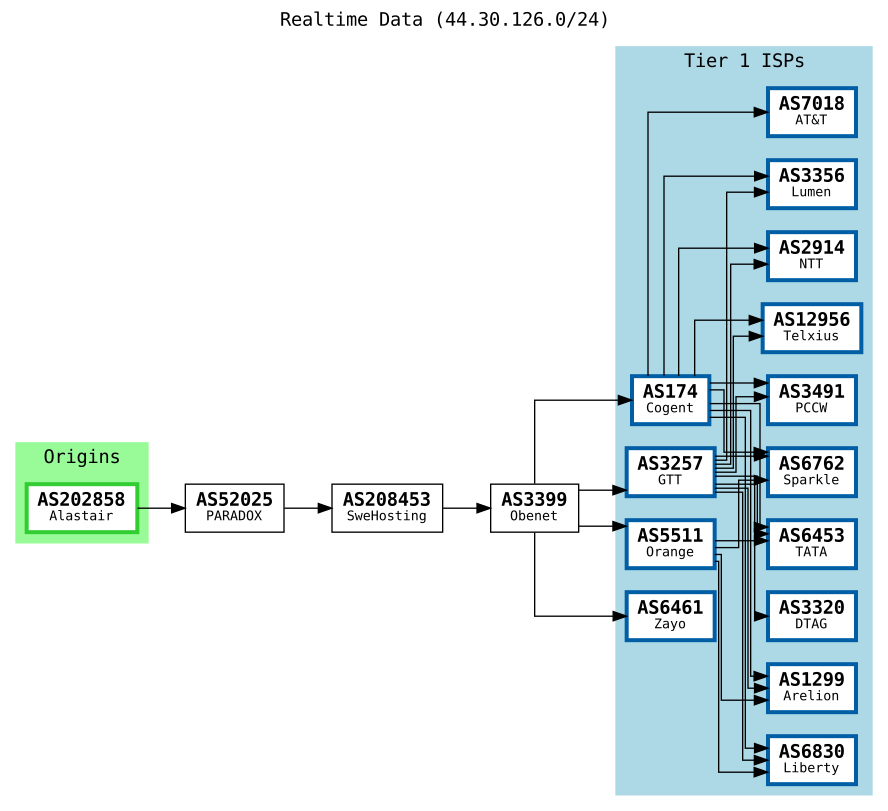
Shown above is a diagram showing this connection hierarchy (produced by BGP.tools) for my particular prefix in Stockholm. We see here that in order to reach a destination on the rest of the internet, traffic from AS202858 must go AS52025. If it cannot reach its destination via that network and its peers, it travels to AS208453, and so on until it reaches a Tier 1 ISP, which is defined as a network that through peering agreements alone can reach any other internet connected host.
It’s up to each AS to determine what they do about routes to prefixes downstream of them that they know about. What’s happening in this case (not shown on this diagram) is that AS52025 is telling their peers at internet exchanges that they have a route to my prefixes. Usually this is good! More peers means more direct connections, but in this case it could be having a negative affect on ping times. Can we instruct these upstreams to announce the downstream prefixes to only a subset of their peers and other upstreams? Indeed we can - using BGP communities.
BGP Communities
I honestly thought BGP Communities were literal communities of networks. Sort of like a neighbourhood. Allegedly the name comes from the fact that you can export ‘communities’ of prefixes that you would want to instruct others to treat in some particular way. I’d have called them ’tags’ or something. I digress.
Each individual AS will have their own list of communities that they’ll both add to routes they send you (informational communities) and ones that if they receive, will treat the prefixes in a specific fashion. Communities typically take the form of a tuple of 2 or 3 numbers. Usually, but not always, the first one is the AS number of the network from which the informational community came from, or the one to which we want to tell something to.
That’s just about the only convention though, and the information you need might be on the network providers website, portal, documentation, or nowhere. Once again, BGP.tools steps in to help with an effort to aggregate known communities for particular ASs in the ‘Communities’ tab for a particular AS. Other useful places to look are Hurricane Electric and PeeringDB. On the page for AS52025 - I noticed an interesting community that might help: 52025:65530 Do not export out of metro (no backbone)
As I understood it, this should instruct AS52025 to communicate my prefixes only to those networks that it is peering with in Stockholm and any upstreams they have there. I changed my filter section in my BIRD config to look like this in order to append this community to the route:
filter upstream_filter {
	if (net.type = NET_IP4 && net ~ [ 44.30.126.0/24 ]) then {
	        # Do not export out of metro
	        bgp_community.add((52025, 65530));
	        accept;
	}
	if (net.type = NET_IP6 && net ~ [ 2001:67c:298::/48 ]) then {
            # Do not export out of metro
            bgp_community.add((52025, 65530));
            accept;
    }
}
And then tried to ping again from Hetzner:
$ ping -4 44.30.126.1
....
--- 44.30.126.1 ping statistics ---
20 packets transmitted, 20 received, 0% packet loss, time 19022ms
rtt min/avg/max/mdev = 7.950/8.209/8.780/0.177 ms
and
$ ping -6 2001:67c:298::1
....
--- 2001:67c:298::1 ping statistics ---
20 packets transmitted, 20 received, 0% packet loss, time 19025ms
rtt min/avg/max/mdev = 8.017/8.338/9.400/0.276 ms
Awesome! Now we have an average of ~8ms Round Trip Time between an instance in Helsinki and one in Stockholm - as opposed to closer to 40ms.
Results
To prove it, let’s run MTR simultaneously to the instance, one using its provider supplied address (left) and one using our prefix above. For brevity - this is shown just for IPv4:
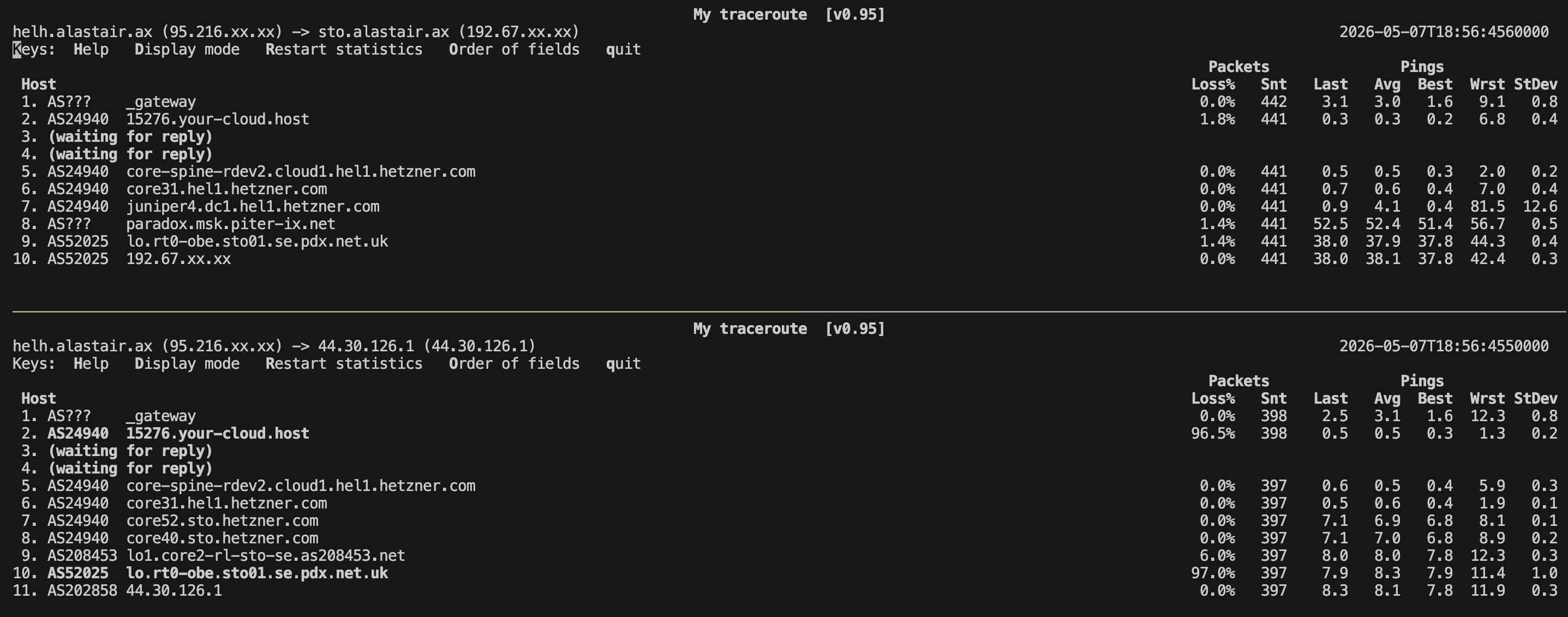
Despite there being two distinctly different target IPs here - they are indeed the same destination - and have very different routes to get there from the origin.
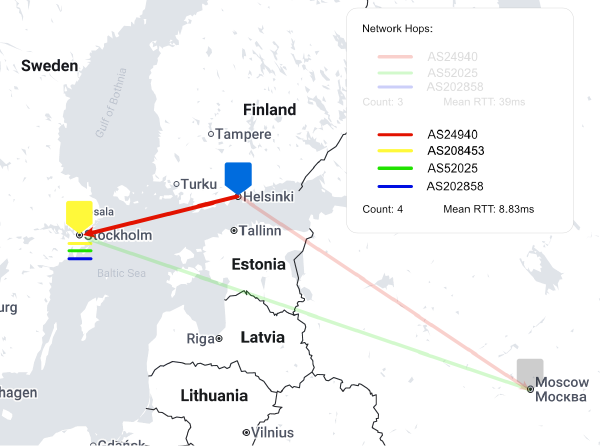
Let’s update the map:
And our table from earlier:
| Source ISP | Stockholm - Before (ms) | Stockholm - After (ms) |
|---|---|---|
| DNA - IPv4 | 38.6 | 8.1 |
| DNA - IPv6 | 27.9 | 8.3 |
| Telia (5G) - IPv4 | 98.5 | 51.6 |
| Telia (5G) - IPv6 | 58.3 | 57.1 |
| Hetzner VPS (Helsinki) - IPv4 | 39.2 | 8.1 |
| Hetzner VPS (Helsinki) - IPv6 | 38.8 | 8.1 |
Conclusion
Here I learned that, especially when running an anycast style network, carefully controlling the places where the prefixes are announced (more aren’t always better!) is essential for making sure that the optimal node responds to the network traffic. These improvements shown here also depend on the networking decisions of the source networks remaining consistent. If, for example, Hetzner stopped peering with SweHosting in Stockholm - it’s possible that the performance might actually be degraded by these changes.
Although I haven’t tried it out yet, I can also believe that in densely served areas, actually going further away - in terms of network hops and distance, might reduce network latency in order to take advantage of higher bandwidth connections between the source and the destination.
As a next step, I’d like to go further and figure out the fastest way across my network when handing off to another network. Can I use my network of PoPs to take packets originating from one router, but destined for a network outside of my control, and pass them across the internet in a quicker way than what my ISP would do?
